UPI Deposits, Jalwa
Everything on upi deposits for jalwa in one place, timings, requirements and what to check first.
What is UPI Deposits?
UPI deposits on Jalwa let you fund your gaming account instantly using India's Unified Payments Interface, the real-time payment network built and regulated by the National Payments Corporation of India (NPCI). Instead of entering long card numbers, remembering net banking passwords, or waiting for NEFT transfers to clear overnight, you authorise a payment directly from any UPI-linked savings or current bank account in under 10 seconds. The debit hits your bank account immediately, and your Jalwa wallet balance updates in the same breath, no pending states, no delays.
Launched in 2016 and now processing over 10 billion transactions a month across India, UPI has become the country's default digital payment rail. On Jalwa (jalwax.org), UPI is the fastest and most widely accepted deposit method available to Indian players. Every major UPI app is fully supported, including Google Pay (GPay), which routes collect requests directly to any GPay-linked bank account and surfaces them as standard payment notifications; PhonePe, India's highest-volume UPI app, which lets you hold multiple bank accounts under a single handle; Paytm UPI, which routes deposits through Paytm Payments Bank or any linked scheduled bank account; BHIM, the government-issued reference app built for players who prefer a direct, no-frills bank experience; Amazon Pay UPI, useful for players who maintain a balance in their Amazon Pay wallet linked to UPI; and any bank's own native UPI app, SBI Pay, HDFC MobileBanking, iMobile Pay from ICICI, Kotak 811, Axis Pay, and every other NPCI-registered application are all accepted on Jalwa without restriction.
Deposits are credited to your Jalwa wallet in real time the moment NPCI confirms settlement. There are zero transaction fees charged by the platform, the ₹0 deposit cost is a firm policy on Jalwa, not a promotional offer tied to a specific period or user tier. The minimum deposit via UPI is ₹100, which is the lowest threshold of any payment method in the Jalwa cashier, making it accessible to casual players and high-volume players alike.
For context, net banking on Jalwa requires a ₹500 minimum and often involves a redirect to your bank's portal and a manual login step, none of which applies to UPI. Debit card deposits carry a ₹200 minimum and can attract card-processing fees depending on your issuing bank. UPI eliminates both barriers: lower entry point, no added cost.
UPI vs Other Deposit Methods on Jalwa
| Feature | UPI | Net Banking | Debit/Credit Card |
|---|---|---|---|
| Processing time | 5 to 10 seconds | 1 to 5 minutes | 30 seconds, 2 minutes |
| Deposit fee on Jalwa | ₹0 | ₹0 | May vary by card type |
| Requires card/account details entry | No, UPI PIN only | Yes, bank credentials | Yes, 16-digit card number + CVV |
| Works 24/7 | Yes (minor bank windows excepted) | Partial (bank downtime risk) | Yes |
| Minimum on Jalwa | ₹100 | ₹500 | ₹200 |
| Daily limit | Up to ₹1 lakh (bank-set) | Up to ₹10 lakh (varies) | Depends on card limit |
How UPI Deposits Works
The full process on Jalwa takes fewer than 60 seconds from opening the cashier to seeing a credited wallet balance. There are two sub-flows available: the VPA collect request and the QR code scan. The VPA flow is best for desktop users because the notification arrives directly on your phone. The QR flow suits mobile users who can instantly switch between browser and UPI app. Both are described below in full detail.
Step-by-Step: VPA Collect Request Flow
- Log in to your Jalwa account at jalwax.org using your registered mobile number and password. Click the Deposit button in the top navigation bar or tap the wallet icon in the Jalwa mobile app.
- Select UPI as your payment method. Jalwa lists UPI first in the cashier because it is the recommended option for Indian players. A padlock icon confirms the page is SSL-secured throughout the transaction.
- Enter your deposit amount. The minimum UPI deposit on Jalwa is ₹100. Type the exact rupee amount, ₹500, ₹1,000, ₹5,000, or tap one of the cashier's preset quick-select buttons (₹200, ₹500, ₹1,000, ₹2,000) to populate the field without typing.
- Enter your UPI VPA (Virtual Payment Address). This is your UPI ID, for example,
rahul.sharma@okaxis,9876543210@ybl(PhonePe handle format), ormyname@oksbi(Google Pay via SBI). Every UPI app assigns at least one VPA automatically at registration. Find yours inside your app under Profile or Settings → My UPI IDs. - Click Pay Now and wait for the collect request. Jalwa's payment gateway sends a real-time collect request via NPCI to the UPI app linked to your VPA. Within 3 to 5 seconds, your phone receives a push notification, for example, "Jalwa requests ₹500 via Google Pay" or "Incoming payment request of ₹1,000 on PhonePe."
- Open your UPI app and approve. Review the payee name (Jalwa / jalwax.org), the amount, and the reference note. If everything matches what you entered in the cashier, enter your 4- or 6-digit UPI PIN and tap Pay. Never approve if the payee name or amount differs from what you initiated, cancel immediately and contact Jalwa support.
- Receive instant wallet credit. The Jalwa cashier refreshes automatically once NPCI broadcasts the settlement confirmation, typically within 5 to 10 seconds of PIN entry. Your updated wallet balance appears at the top of the screen. Simultaneously, your bank sends an SMS debit alert containing a 12-digit UTR (Unique Transaction Reference) number, copy and save this as your payment proof.
Step-by-Step: QR Code Scan Flow
- Complete the login, UPI selection, and amount entry steps described above.
- Choose the Scan QR option instead of entering a VPA. A unique Jalwa payment QR code is generated specifically for your session and displayed on screen.
- Open PhonePe, GPay, Paytm, BHIM, or any UPI app on your phone and tap the Scan QR or camera icon on the app's home screen.
- Point your camera at the Jalwa QR code displayed on your screen. The app auto-reads the merchant name and the pre-filled amount.
- Confirm the details and enter your UPI PIN to approve. Wallet credit follows within 5 to 10 seconds exactly as in the VPA flow.
What Happens in the Background
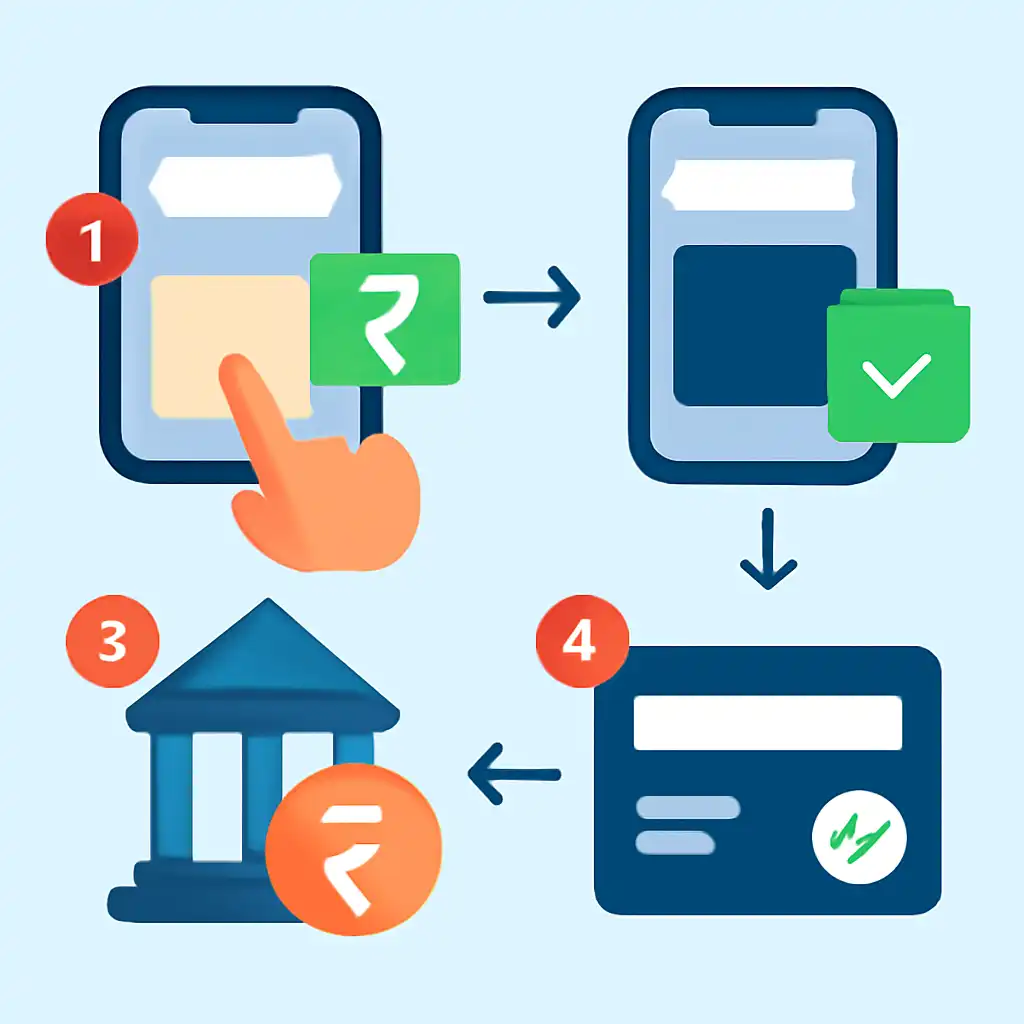
When you approve a UPI collect request, your bank debits your account and sends a confirmation to the NPCI switch over the UPI interoperable infrastructure. NPCI relays that confirmation to Jalwa's payment processor in real time. Jalwa's backend credits your wallet the moment it receives the NPCI "success" status code. This entire chain, bank debit to wallet credit, completes inside a single NPCI settlement cycle, which is why UPI deposits feel instantaneous. Net banking, by contrast, often queues the payment through an intermediate gateway with manual reconciliation steps that can introduce 2 to 5 minute delays even on a fast connection.
| Detail | Value |
|---|---|
| Minimum deposit | ₹100 |
| Processing time | Instant (5 to 10 seconds) |
| Deposit fees | ₹0 (Jalwa charges none) |
| Collect request timeout | 5 minutes, no charge if expired; simply retry |
| Daily deposit limit | Subject to your bank's UPI limit (typically ₹1 lakh per day) |
| Supported apps | All NPCI-registered UPI apps |
| UTR reference provided | Yes, 12-digit reference from your bank SMS |
UPI Deposits for New Players
If you have just created your Jalwa account, your first UPI deposit activates your full playing balance and triggers the new-player welcome bonus. There are a few one-time steps unique to first-time depositors that returning players never encounter. Working through the checklist below before you open the cashier ensures your first transaction succeeds without any avoidable friction.
Pre-Deposit Checklist for New Jalwa Players
- Verify your registered mobile number matches your UPI app. During Jalwa registration you entered a mobile number. That number must be the same one linked to the UPI app you intend to use. If you registered on Jalwa with +91 98765 43210 and your PhonePe account is registered on the same number, the collect request routes correctly. A mismatch sends the request to an unlinked device and the payment fails silently with no debit to your account.
- Complete basic KYC if prompted. Jalwa may display a KYC prompt on your first cashier visit. This typically requires uploading a photo of your Aadhaar card or PAN card. Accounts with incomplete KYC can deposit but may face withdrawal restrictions later, completing it upfront saves friction. Verification usually clears within 30 minutes during business hours.
- Check and raise your UPI daily limit if needed. NPCI sets a default UPI transaction limit of ₹1 lakh per day per UPI handle, but several banks default new account holders to ₹5,000 to ₹25,000. If you plan a first deposit above ₹5,000, open your bank's UPI app, navigate to Limit Settings or UPI Preferences, and raise the per-transaction or daily cap before initiating the deposit. This change takes effect immediately or within a few minutes depending on your bank.
- Ensure sufficient cleared balance. UPI draws from your available (cleared) balance, not your total ledger balance. A cheque deposit still in clearing will not be accessible via UPI even if it shows in your account summary.
Claiming Your Welcome Bonus on Your First UPI Deposit
Jalwa's new-player welcome offer is calculated on your initial deposit amount, not on cumulative subsequent deposits. The size of your first UPI transfer directly determines the bonus credit you receive. To claim it correctly: first, visit Promotions on Jalwa before opening the cashier and note the minimum qualifying deposit (e.g., ₹500) and the maximum bonus cap (e.g., 200% up to ₹10,000). Then enter a single deposit amount that meets or exceeds the minimum threshold, depositing ₹499 when the minimum is ₹500 forfeits the entire bonus.
If the Jalwa cashier displays a Bonus Code or Promo Code field, enter your code before clicking Pay Now; codes cannot be applied retroactively after the transaction is submitted. Once the UPI payment settles, the bonus posts to your account automatically, check My Bonuses to confirm it appears.
Critical mistake to avoid: Do not split your intended first deposit into two smaller UPI transactions (for example, two transfers of ₹1,000 rather than one transfer of ₹2,000). The welcome bonus is evaluated against the single largest qualifying transaction. The second transfer is treated as an ordinary top-up with no bonus attached, and the split cannot be undone once both payments have settled. Deposit the full intended amount in one go to ensure maximum bonus eligibility and a clean account history for any future KYC reviews.